

User intent
“Faro, help me sort out tomorrow.”
Looking for a Product Designer, have a project, or just want to say hi?
Faro
AI interfaces · Voice UX · Systems design
Clipboard access was blocked. Select and copy this prompt, then paste it into ChatGPT.
Open ChatGPTFaro is a conceptual AI execution layer for coordinating tasks across devices.
I designed the interaction model around five core pieces:
The goal was not to design a more conversational assistant. It was to design a system that could act in the background while still making its actions inspectable, interruptible, and reversible.
Modern knowledge workers often act as manual infrastructure between disconnected tools: moving information across apps, re-entering context, checking updates, and translating intent into app-specific actions.
AI assistants are becoming more capable, but delegation still feels unreliable when users cannot see what the system is doing, why it is doing it, what information it is using, or when it needs help.
This creates a trust gap. The more invisible the execution becomes, the more important it is for the system to communicate state, uncertainty, and control clearly.
Faro explores how an AI system could execute across devices while preserving visibility, restraint, and user trust.
Because much of Faro’s execution happens in the background, trust could not depend on constant screen attention.
The system needed to make invisible work feel inspectable through lightweight feedback: what is happening, what changed, what is uncertain, and when the user needs to intervene.
I treated trust as a system behavior rather than a feature.
Instead of designing a chatbot, I approached Faro as an execution system.
The product needed to balance autonomy with reassurance: acting when the task was low-risk, asking when intent was unclear, and pausing when the consequence was high.
Users needed to understand:
The execution architecture became a trust model: delegation, orchestration, confirmation, execution, and recovery.
“Faro, help me sort out tomorrow.”
Calendar, unread messages, travel time, existing commitments.
What can be automated, what needs clarification, what is risky.
Two overlapping priorities detected.
Faro asks before changing a high-impact commitment.
User selects intent, timing, or preferred action.
Proposed schedule change appears before execution.
Calendar update and message draft are prepared.
User sees what changed and why.
User can approve, edit, cancel, or undo.
The diagram presents Faro’s operating model as a three-stage process: Delegation, Orchestration, and Execution.
In the Delegation stage, the user expresses an intent: “Faro, help me sort out tomorrow.” Faro gathers relevant context, including the user’s calendar, unread messages, travel time, and existing commitments. It then estimates its confidence by determining what can be automated, what requires clarification, and which actions may be risky.
In the Orchestration stage, Faro detects ambiguity—for example, two overlapping priorities. It requests clarification before changing a high-impact commitment, and the user confirms the intended priority, timing, or preferred action.
In the Execution stage, Faro first presents a drafted recommendation, such as a proposed schedule change, before executing it. It then prepares actions asynchronously, including a calendar update and a message draft. The outcome remains visible so the user can see what changed and why. Finally, the user can review the result and approve, edit, cancel, or undo it.
The workflow illustrates progressive, supervised autonomy: Faro interprets intent and context, identifies uncertainty, asks for confirmation when necessary, and only then performs actions. Its decisions remain previewable, understandable, and reversible.
My first version of Faro behaved too much like a conversational assistant. It responded often, explained too much, and made the experience feel chat-heavy rather than execution-focused.
I moved toward operational feedback instead: short confirmations, visible system states, interruption only when necessary, and a clearer distinction between low-risk automation and high-risk decisions.
The biggest design shift was treating silence as part of the experience. Faro should not narrate everything. It should communicate when the user needs awareness, confirmation, or control.
Faro supports both voice and silent text input because delegation depends on context. Voice works when users are mobile or hands-free. Terminal Mode supports public, focused, or quiet environments without changing the underlying execution model.
One issue I noticed in existing AI assistant patterns was that dialogue overlays can block the interface users are trying to act on. In noisy or hands-busy contexts, users still need to see what the assistant heard, but that feedback should not cover buttons, app content, or the next action.
Faro uses an adaptive focus area: the assistant response gets a reserved system-level space while the active app canvas shifts or compresses below it.
This keeps the conversation visible without turning the assistant into an obstruction, allowing the user and Faro to work in parallel instead of competing for the same screen space.
Faro runs tasks in the background and communicates through lightweight states: listening, reviewing, working, needs confirmation, completed, failed, and rolled back. The interface is designed to reduce attention switching while keeping the user aware of meaningful state changes.
Faro treats uncertainty as a UX state.
Low-risk actions can proceed with lightweight confirmation. Ambiguous or high-risk actions require clarification, preview, approval, or rollback. The system is designed to feel useful without pretending to be certain when it is not.
To make the interaction model concrete, I prototyped a schedule-conflict scenario.
Faro has to interpret a broad goal, review context, detect ambiguity, ask before changing a high-impact commitment, and then execute the low-risk steps while leaving final communication under user control.
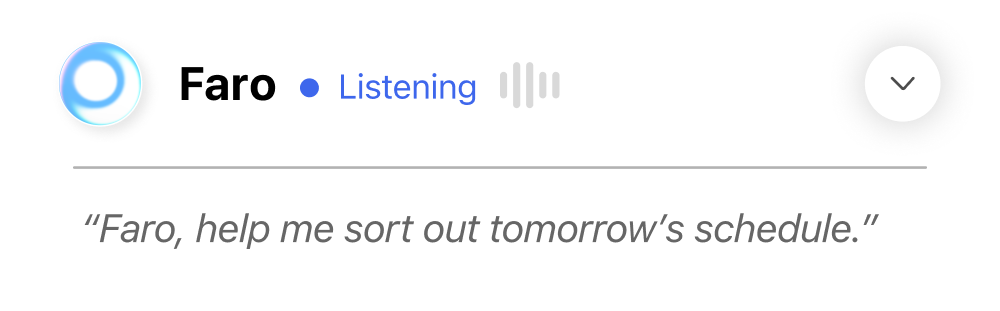
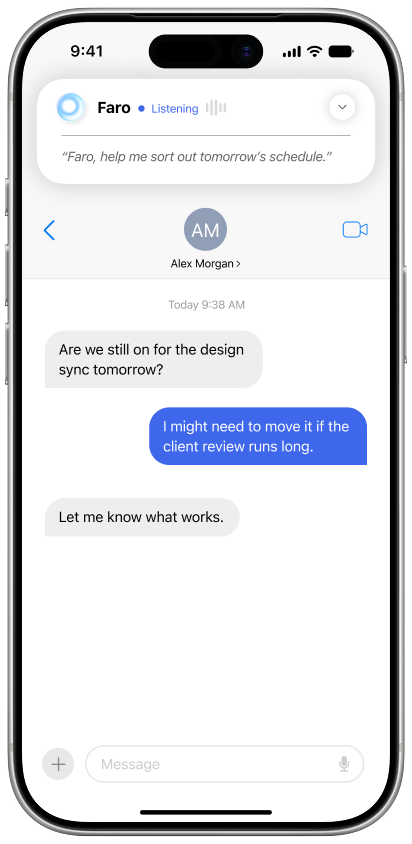
User intent - a broad scheduling goal is delegated.
The first frame shows the user initiating Faro with the open-ended request, “Faro, help me sort out tomorrow’s schedule.” Faro displays a blue “Listening” status, confirming that it is receiving the request but has not yet taken action.
The accompanying message thread provides relevant context. Alex Morgan asks whether tomorrow’s design sync is still happening. The user replies that it may need to move if a client review runs long, and Alex asks the user to decide what works.
This frame represents delegation: the user expresses a broad goal rather than specifying an exact sequence of actions. Faro must interpret the intent and investigate the surrounding context before proposing or making any changes.
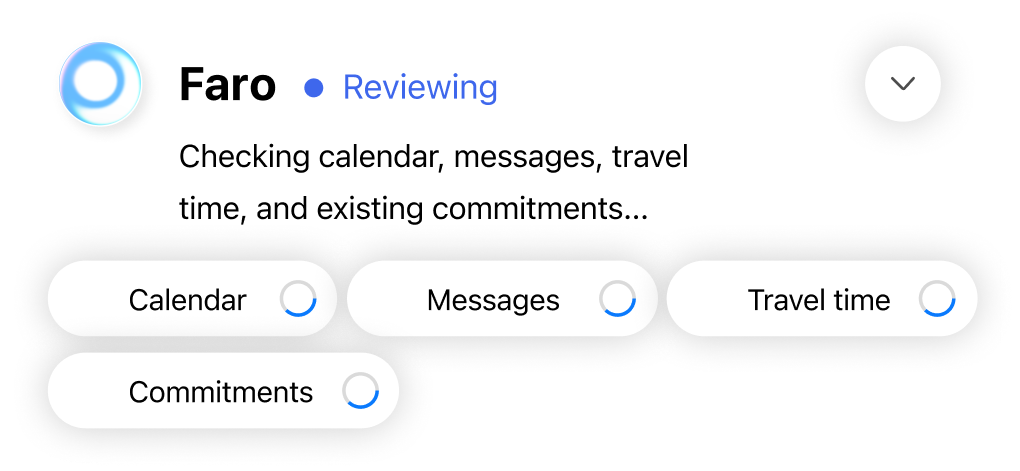
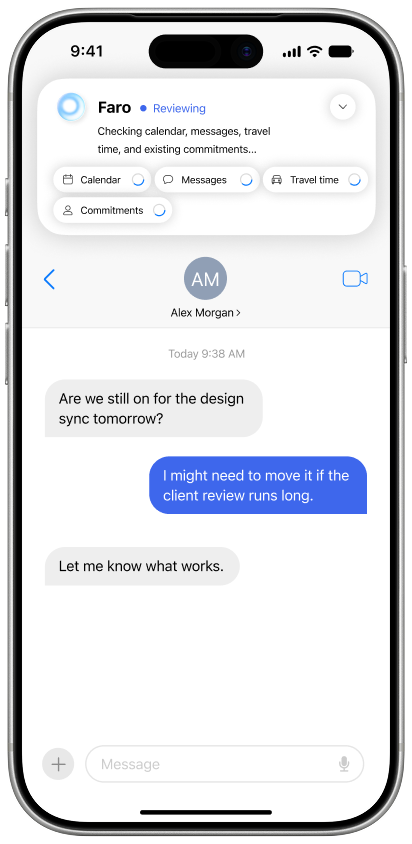
Context review: Faro checks calendar, messages, travel time, and commitments.
The second frame shows Faro in a blue “Reviewing” state. It explicitly identifies the sources it is checking: the user’s calendar, messages, travel time, and existing commitments. Loading indicators communicate that the system is still gathering and evaluating information.
The original message thread remains visible beneath the Faro panel, connecting the investigation to Alex Morgan’s question about the design sync and the user’s warning that a client review might run long.
This frame represents contextual reasoning before action. Faro does not treat the user’s broad request as sufficient authorization to alter the schedule immediately. Instead, it examines multiple sources to understand the situation and identify possible conflicts.
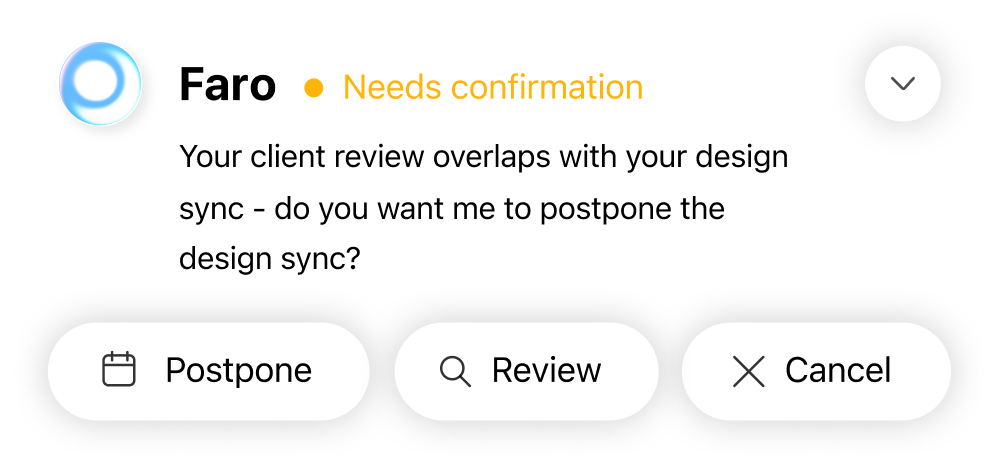
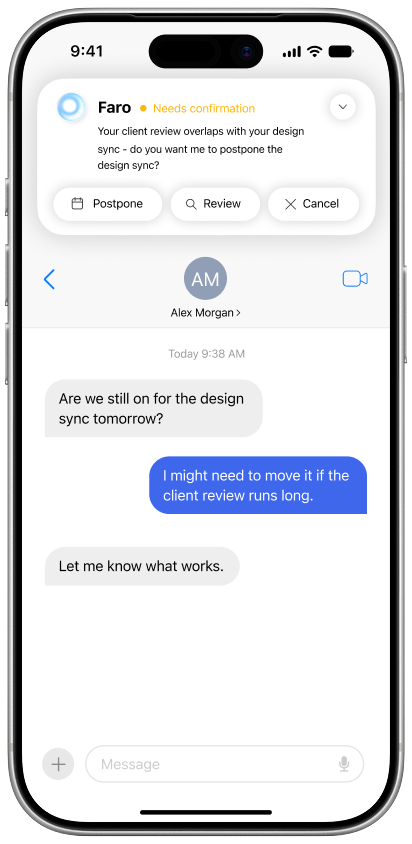
Clarification: ambiguous or high-impact changes require confirmation.
The third frame shows Faro in an amber “Needs confirmation” state. After reviewing the available context, Faro identifies a conflict: the client review overlaps with the design sync. It asks, “Do you want me to postpone the design sync?”
The interface presents three choices: Postpone, Review, and Cancel. Postpone authorizes the proposed change, Review lets the user inspect the situation more closely, and Cancel stops the action.
This frame represents clarification and supervised autonomy. Because moving an existing commitment is ambiguous and potentially consequential, Faro does not decide independently. It identifies the conflict, explains the proposed resolution, and asks for explicit approval before acting.
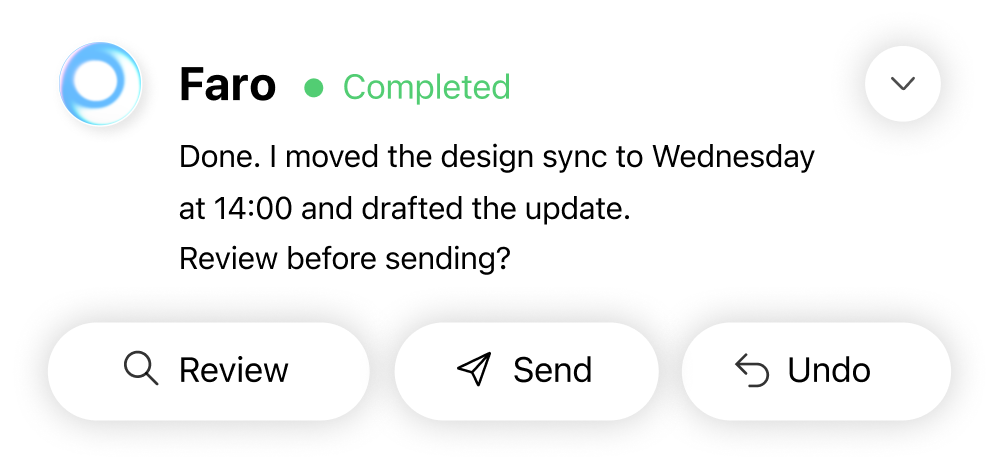
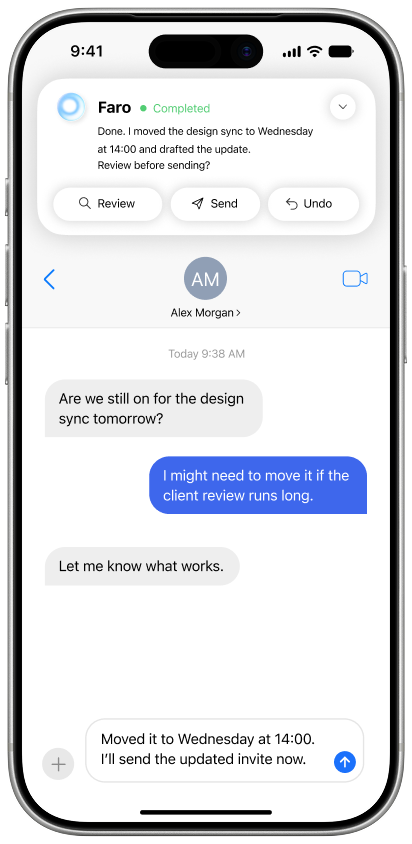
Controlled execution: Faro acts after approval and keeps review, send, and undo available.
The fourth frame shows Faro in a green “Completed” state. It reports that the design sync has been moved to Wednesday at 14:00 and that an update has been drafted. Faro then asks whether the user wants to review the message before sending it.
The available actions are Review, Send, and Undo. A prepared update is visible in the message composer, but the final communication has not been sent automatically.
This frame represents controlled execution. After receiving approval, Faro performs the authorized calendar change and prepares the related communication. The outcome remains visible and reversible: the user can inspect the draft, send it, or undo the scheduling change. Faro therefore automates the low-risk steps while keeping final external communication under the user’s control.
Because a fully functional multi-device agent was outside the scope, I evaluated Faro through simulated execution flows.
I prototyped task scenarios, mapped system states, and stress-tested moments where the system needed to ask for clarification, request approval, show progress, handle latency, or recover from failure.
The strongest pattern I observed while stress-testing the prototype was that trust depended less on how powerful Faro appeared and more on how clearly it communicated uncertainty and restraint.
I started Faro focused on capability and ended focused on trust.
The project taught me that AI interaction design is less about making systems feel autonomous and more about making them legible, interruptible, and reversible.
The strongest AI products may not be the ones that do the most. They may be the ones that know when to act, when to ask, when to stay quiet, and how to recover when they are wrong.
Faro became less about designing an assistant and more about designing the relationship between human attention and machine execution.